TN SSLC Result 2026 Out at tnresults.nic.in: Tamil Nadu Class 10th Results Declared; Here's How to Check
By Lokmat Times Desk | Updated: May 20, 2026 09:49 IST2026-05-20T09:49:18+5:302026-05-20T09:49:28+5:30



The Tamil Nadu Directorate of Government Examinations (TNDGE) declared class 10th results on Wednesday, May 20, at 9.30 am, ...
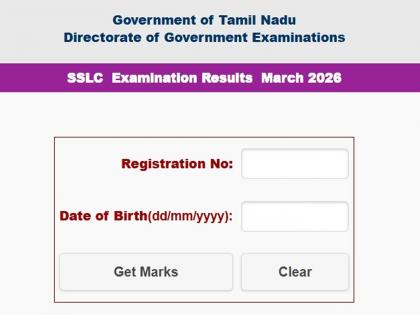
TN SSLC Result 2026 Out at tnresults.nic.in: Tamil Nadu Class 10th Results Declared; Here's How to Check
The Tamil Nadu Directorate of Government Examinations (TNDGE) declared class 10th results on Wednesday, May 20, at 9.30 am, on the official website. Student who have given the SSLC examination in March can download their mark sheet by visiting the official website at tnresults.nic.in.
The TN SSLC written exam was held from March 11 to April 6, 2026. Over 800,000 students attended the exams and are now excited to see their results. To qualify for the TN SSLC Class 10 examinations 2026, students are required to secure at least 35% marks overall and in each compulsory subject.
Here's How to Check TN SSLC Result 2026
1. Visit official website at tnresults.nic.in
2. Click on the link 'TN SSLC Class Xth Examination Results March 2026' from homage.
3 Enter Registration No
4. Date of Birth
5. Click on to "Get Marks"
How to check SSLC Class 10 results via SMS
1. Open SMS application
2. Enter TNBOARD12REGNO, DATE OF BIRTH
3. Send it to 092822 32585 or +91 92822 32585
TN SSLC Result 2026 via DigiLocker
1. Open DigiLocker app or website
2. Log in using your Aadhaar register number
3. Navigate to the “Education” or “Results” section on the homepage.
4. Choose Tamil Nadu Board from the dropdown menu
5. Click on “SSLC Result 2026”
Open in app